Congrats on the Backup! Now, where's the App?
.png)
July 15, 2026

Outages start for different reasons: ransomware, cloud infrastructure failures, and now even an over-permissioned AI agent. But once the application goes offline, the first question is always the same: do we have backups?
In the cloud, the answer is necessary but rarely sufficient. An application is a dependency graph of identity, networking, keys, routing, scaling rules, and control-plane configuration that makes “healthy” resources actually usable. Backups usually cover one node, and incidents find the rest.
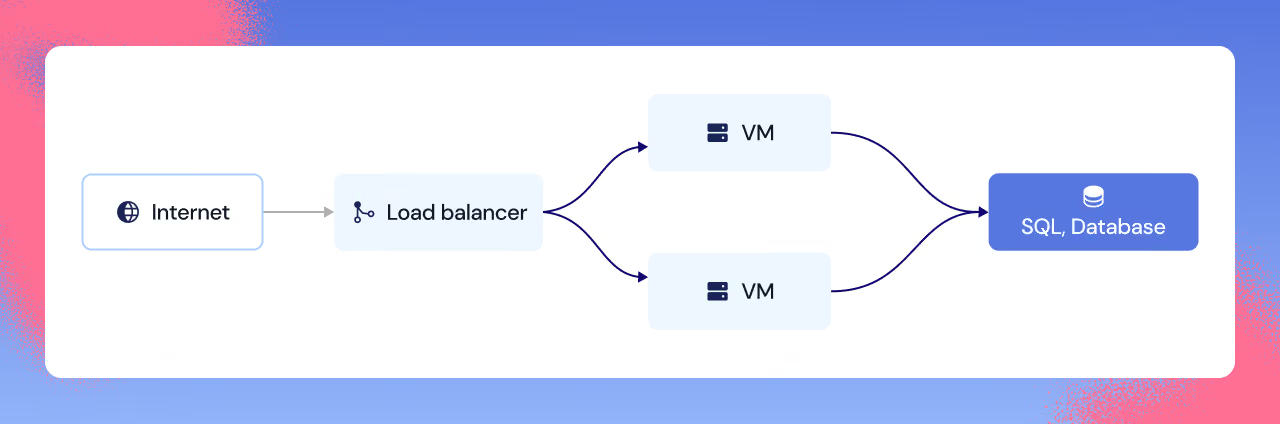
Take a simple architecture: two web servers behind a load balancer, fronting a database. Let’s assume we’ve nailed the backup part - we have frequent healthy restore points, protected by immutability, ready to go.
Keys keep the data locked
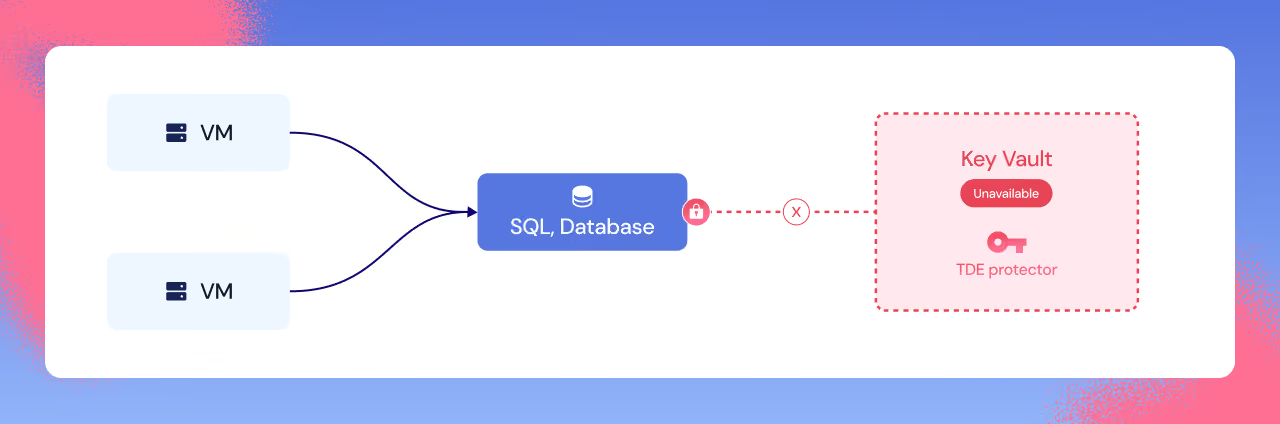
We kick off the restore, and the first place the dependency graph shows itself is the database. Many production databases use encryption with a customer-managed key, as it's a good practice and sometimes a compliance requirement. In that case, the DB is encrypted by a key that sits outside of the backup, in a separate key vault.
If the key vault is unavailable because permissions changed, network access tightened, or the key was disabled or deleted, the restore fails outright. And even when it "succeeds," the data is still effectively unusable. Nobody thought of the vault as part of the dependency graph, and so the restore returns useless ciphertext rather than a working database.
Private connectivity stays unreachable
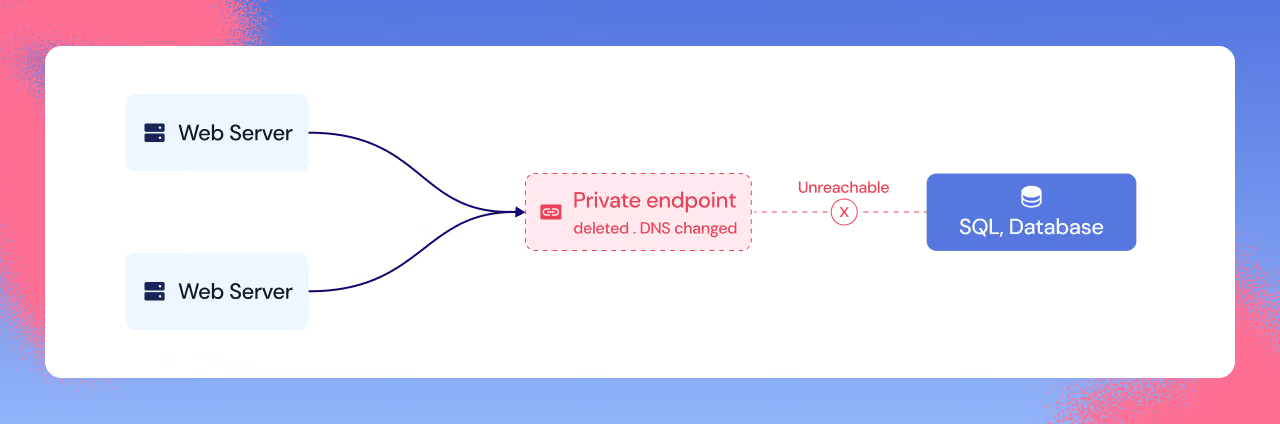
We get through the Key Vault fight and regain access. The database comes back online with data intact, but the app still times out. The data is often intact. The plumbing around it is gone.
Say the database is only reachable through Private Link (a common production setup). If the private endpoint is deleted or DNS is changed, the database can be perfectly restored and still completely unreachable to the VMs. That endpoint and DNS aren’t in your backups, so the DB is up and healthy, but the web servers cannot find it.
Authentication breaks under restore
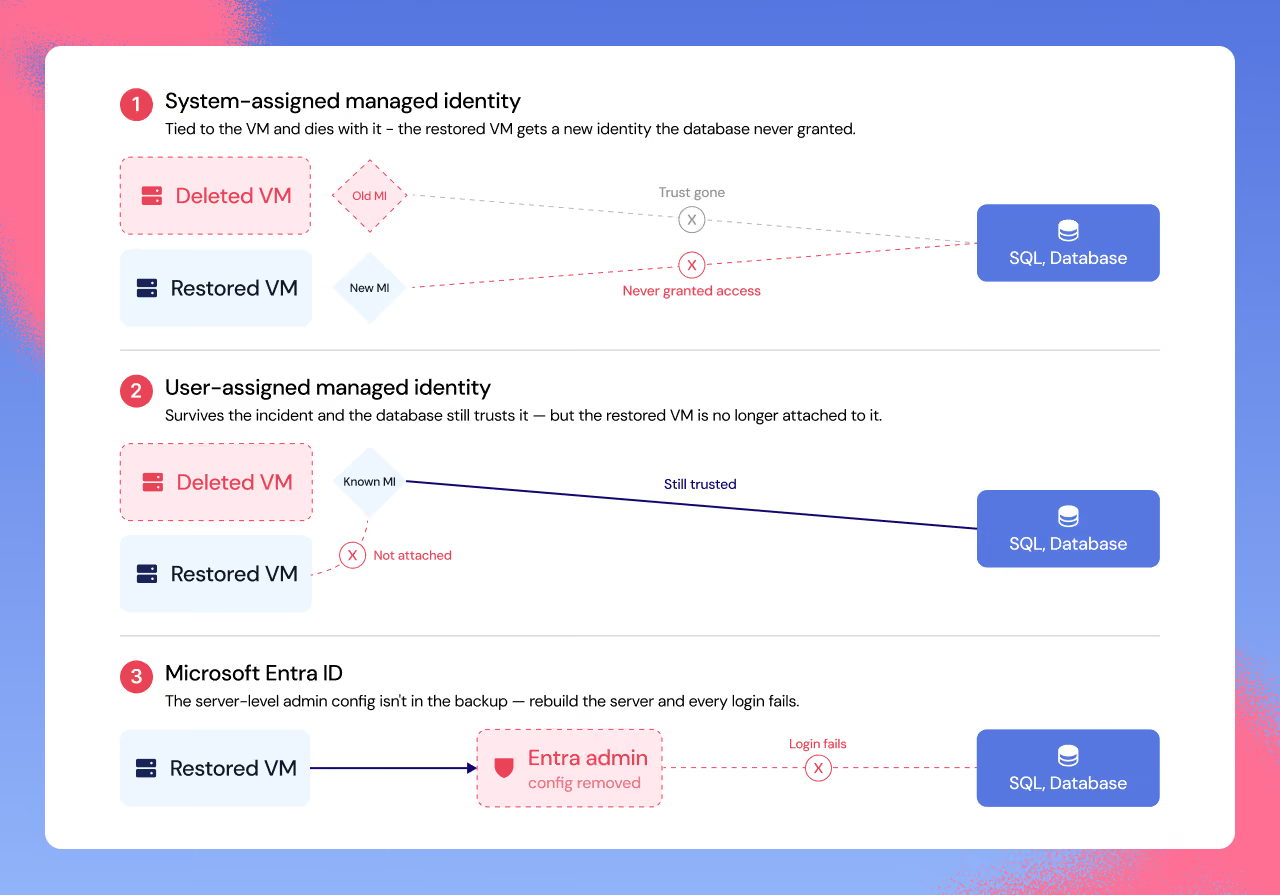
Now we’ve successfully restored the private link, timeouts stopped, but identity blows up. Restores often recreate resources instead of rewinding them in place, which can swap out the identity under the app’s feet, and authentication breaks no matter which method you picked.
A system-assigned managed identity is tied to the VM resource and dies with the old VM. The restored VM comes back as a different resource with a different identity, and the database has never granted it access. Until we spot what changed, the clock keeps running. A user-assigned managed identity exists independently of the VM and survives the incident, but the new VM will not be attached to it. Authentication would happily accept that identity, and yet every login still fails because the restored VM is not using it.
Microsoft Entra ID authentication breaks in a different way. Entra-based access depends on server-level configuration that database backups do not capture. If the server was deleted and rebuilt, or if an attacker, script, or well-meaning change removed the Entra admin, the database can be "up" while every login fails until someone reconfigures it.
The front door stays dark
By now we’ve made it through key access, private connectivity, and authentication. The database is finally up, and the data looks fine. It feels like the hard part should be behind us, but then we discover the front door is broken.
VM backups bring the machines back, but they don’t magically recreate the load balancer setup that makes the app reachable. If the LB is missing or slightly different (frontend IP changed, backend pool empty, probes/rules gone), or the restored VMs come back with different NIC/IP details, you get the classic post-restore failure: servers are running, but traffic lands nowhere. The VMs are alive, but the app is still down.
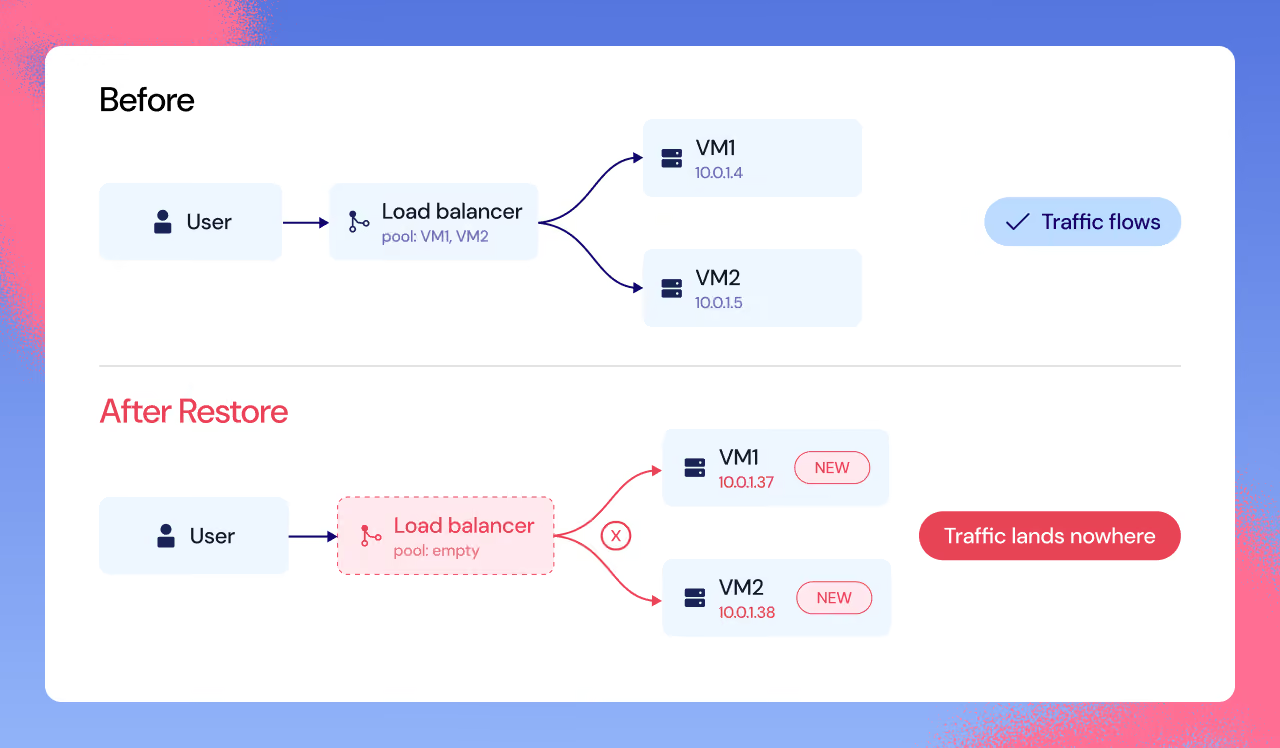
When "we have backups" turns out to be wrong
So far the assumption has been that backups existed. Even that isn’t trivial. Many teams rely on point-in-time restore for most of their Azure SQL databases (low RPO, up to 35 days retention) and configure long-term retention only for a handful of databases flagged as important. Then the day comes, the logical SQL server the databases sit on is deleted, and you learn the distinction the hard way: point-in-time restore can restore a deleted database only while the original logical server still exists. Delete the server, and the databases’ PITR restore path disappears with it. Long-term retention is the only path that survives a server deletion, and it shows up as a small note in the docs that is easy to miss until it is gone.
Resiliency Posture Management makes the graph visible
Recovery in the cloud is the work of reassembling an application's dependency graph under pressure. An application is only as recoverable as its weakest dependency, and the weakest dependency is rarely the part anyone backs up first.
We call this discipline Resiliency Posture Management, or RPM: continuously evaluating every workload against the recovery mechanisms it depends on. That includes mechanisms like backups, where we validate health, retention, frequency, protection, and coverage, or infrastructure-as-code, where we monitor drift and management gaps as the environment changes. RPM also means evaluating the resiliency of dependency chains and business-meaningful groups, rather than trusting the incomplete picture you get from looking at one resource at a time.
Major frameworks are increasingly requiring this kind of evaluation. NIST CSF 2.0 and DORA Article 11 both measure recovery by whether services are available again. NIST’s Recover function focuses on restoring operations and returning systems to normal availability. DORA Article 11 requires financial entities to prioritise the resumption of critical activities and subjects recovery plans to independent review. The key point is the same in both: restoring resources is not the same as recovering a working application.
So the real question isn’t “do we have backups?” It’s whether we can restore the application within the time we promised the business. A restore that succeeds on paper doesn’t end the incident; the incident ends when the app is actually up again. If you can answer that with evidence, you’re resilient. Book your Resilience Assessment.
You ask? We answer
No. A backup gives you a restore point for the data, and immutability protects that restore point from tampering. Neither preserves the surrounding infrastructure and configuration the application needs to run. Keys, private endpoints, DNS records, managed identities, and load balancers all sit outside the backup. An immutable database backup can restore perfectly and still be useless if any one of those dependencies has drifted or been removed.
Restores often recreate resources instead of rewinding them in place, and that can change the identity the application uses to access the database. A system-assigned managed identity may disappear with the old VM. A user-assigned managed identity may still exist, but the restored VM may not be attached to it. And Microsoft Entra ID access can fail if server-level admin configuration was lost or changed. The database can be online and healthy while every login still fails.
Because it protects against database-level deletion, not every deletion scenario. In Azure SQL, point-in-time restore can bring back a deleted database only while the original logical server still exists. If the server is deleted, its databases and PITR backups are deleted with it, and the PITR restore path disappears. Recovery then depends on whether long-term retention was configured, because LTR backups can be restored to a different server.
They need to treat recovery as a dependency problem. Backups are one node in that graph. A recovery plan should cover the full graph around the application: supporting resources, network components, identities, permissions, keys, routing rules, DNS, restore targets, and the order in which those pieces need to come back. Beyond native backups, tools like infrastructure-as-code can help, but only if they are maintained and checked against the real cloud environment. Teams need to track dependencies, detect drift, follow cloud changes, and make sure every node in the recovery chain is restorable. The plan does not end with storing backup data; it has to keep the whole recovery path valid over time.
Azure SQL TDE encrypts the database, backups, and transaction logs at rest. With customer-managed TDE, the key that protects the database encryption key sits outside the database, in Azure Key Vault or Azure Managed HSM. That makes the key store, the key, the permissions, the managed identity, and the network path part of the recovery chain. If Azure SQL can no longer access that key, the database can become inaccessible even though the backup still exists.
.avif)



Resilience, verified. In your inbox
The latest from Gambit: research, insights, and live sessions