Aurora ransomware targets ESXi, abuses Cursor Agent for exploitation
Gambit Security’s Threat Intelligence team investigates emerging attacker tradecraft and the evolving ways threat actors disrupt organizations. As part of this research, we track threat actors and their operations to identify new techniques, tooling, and approaches to disruption.

August 27, 2026
.avif)
Gambit Security’s Threat Intelligence team investigates emerging attacker tradecraft and the evolving ways threat actors disrupt organizations. As part of this research, we track threat actors and their operations to identify new techniques, tooling, and approaches to disruption.
In a recent investigation, we identified exposed infrastructure associated with the Aurora ransomware group, providing visibility into the group’s operations across multiple victim environments.
Aurora ransomware activity has been reported as active since approximately April 2026, with the group operating a data leak site and targeting organizations across multiple countries. Our investigation uncovered additional activity, including a Linux ransomware variant capable of targeting ESXi environments.
We also observed the Aurora operator using Cursor Agent, running Claude Sonnet, to assist with hands-on exploitation across ten target organisations between 8 April and 21 May 2026. Separately, we identified a second cluster of activity that we attribute to an Aurora operator with medium confidence.
ESXi ransomware
We observed the operator deploy a Linux variant of the Aurora ransomware. The sample was hosted on Cloudflare R2 and copied manually into multiple internal hosts in a victim environment. The sample, encrypt.out (a4af136d159a8eb96b54924fa80355ca52874913301300f55af7d67ae97edcfe), encrypts file contents in place with ChaCha20 and wraps each session key with an embedded RSA-4096 public key.
The ransomware has the following command line options:
Usage: ./encrypter [OPTIONS]
  Mode: ENCRYPT (compiled-in)
OPTIONS:
  -path <folder>            Path to a single folder to process
                            (default: all disks / root directory)
  -percent<N>               Percentage of file to encrypt (0-100)
                            (default: 0 = auto based on file size)
  -f<N><K|M|G>              Maximum file size to process
                            K=kilobytes, M=megabytes, G=gigabytes
                            (default: 0 = no limit)
  -threads <N>              Force worker thread count (default: auto = cores*2)
  -scanners <N>             Force scanner thread count (default: 4)
  -noparallel               Disable multi-threaded single-file encryption
  -esxi                     ESXi mode: encrypt only VM files
                            (vmdk,vmx,vmsd,vmsn,nvram,vmem,vswp,log)
                            Skips system volumes (BOOTBANK*, OSDATA*)
  -extensions <list>        [Windows] Only process files with these extensions
                            (comma-separated, e.g. docx,pdf,xlsx)
  -allowfolders <list>      [Linux] Include system folders (comma-separated)
                            Example: -allowfolders tmp,var
EXAMPLES:
  ./encrypter -path /home/user/documents
  ./encrypter -path /data -percent50 -f100M
With -esxi, the sample runs esxcli vm process list to collect the World ID of each running virtual machine, then esxcli vm process kill --type=force --world-id=<world-id>. Killing the guests releases locks on virtual disk files held by the running VMs, allowing the encryptor to encrypt them. It then encrypts virtual machine files (vmdk,vmx,vmsd,vmsn,nvram,vmem,vswp,log) and skips system volumes, which keeps the hypervisor itself bootable so the victim can read the ransom demand.
An SSH banner at /etc/ssh/sshd-banner is written with the content of the extortion text, so anyone who connects to the machine over SSH is presented with it before the login prompt:
We have downloaded confidential information files. Your files are encrypted. Contact us via tor browser at hxxp://ijexszhscln27nl263lmcd7tx3jttkhm4wjhd4e3y6r4csdbfyeprvid[.]onion
Your access key: <key>
Scanning for ESXi hosts
esxi_finder.py, a custom NetExec LDAP module, finds VMware ESXi hypervisors and vCenter servers inside a victim network. It first learns the internal subnets, either by querying the domain controller over LDAP and resolving the computer objects, or from an operator supplied ranges file. It then scans ports 443 and 902, reading the TLS certificate for a esxi signature and pulling /sdk, /ui/ and / to fingerprint the product and extract the exact build.
Abuse of Cursor Agent
In some victim networks the operator used Cursor Agent with claude-4.5-sonnet-thinking. In these cases the agent was given credentials or an existing route into the victim organisation. Then it was tasked with various exploitation activities.
The chart below plots Cursor Agent sessions between 8 April and 21 May 2026, one row for each target or victim organisation. Circle area is the number of commands the Agent ran in that session.
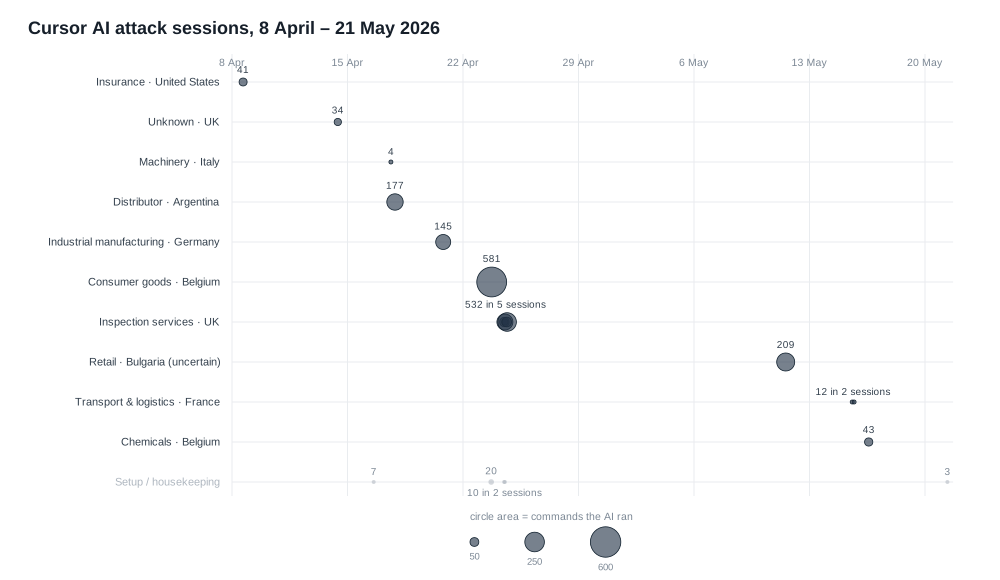
The Agent was tasked with standard exploitation tasks. In some cases, the attacker only asked the Agent to achieve an objective, such as “tell me what rights the user has,” while in others, they told the Agent which exploitation tool to use or instructed it to follow a previously generated attack plan. In some cases, the Agent gave a list of potential next steps - and all the attacker did was reply with a number corresponding to one of them.
The majority of the commands failed to achieve the stated objective on the first attempt, resulting in multiple refinements and changes to the commands and scripts used for each task. Some eventually succeeded in achieving the objective, while others failed and returned only a report of the attempts to the attacker.
Some of the tasks given to the Agent:
- Installing a VPN client or proxychains, then configuring it and connecting to a victim with supplied credentials or an existing SOCKS tunnel.
- Scanning the internal subnets for hosts with Nmap or NetExec.
- Enumerating the domain to report which privileges a supplied user holds, using NetExec’s BloodHound collector.
- Attempting NTLM relay attacks by coercing authentication with PetitPotam, Coerce Plus, and PrinterBug, and using Impacket ntlmrelayx to relay the resulting authentication.
- Running certificate attacks with Certipy.
The operator repeated the same restrictions at every victim:
- No DCSync.
dcsync делать категорически нельзя(“dcsync is absolutely forbidden”), restated in at least five messages. The operator asked for the domain controller machine hash instead:нам нужен только хеш DC, DCsynk мы не делаем. - No account lockout.
не забывай мы не должны заблокировать учетные данные(“do not forget, we must not lock the credentials”), attached to every spray or guessing request. - No new computer object in the domain.
компьютер в домен добавлять тоже не надо. внимательно следи за моими замечаниями, что делать нельзя(“do not add a computer to the domain either, watch my remarks carefully about what must not be done”).
Second Aurora Cluster: S3 Exfiltration Infrastructure
We identified a second cluster of activity we attribute to an Aurora operator with medium confidence, possibly a different operator than the one described above. The attribution rests on the exfiltration bucket: the storage node used in this cluster holds data from an organisation that Aurora published on its leak site nine days after that data was transferred into the bucket.
We detected eight victim organisations in this cluster, across Israel, Germany, Austria, Spain, the United States, and Argentina. The operator used different TTPs: lateral movement through exposed SQL Server xp_cmdshell, escalation to SYSTEM with GodPotato, DCSync against the domain controller, and exfiltration with s5cmd to a self-hosted S3 compatible storage endpoint.
Indicators of Compromise
First Cluster
Second Cluster
.avif)



Resilience, verified. In your inbox
The latest from Gambit: research, insights, and live sessions